Appointments in the same place as your till
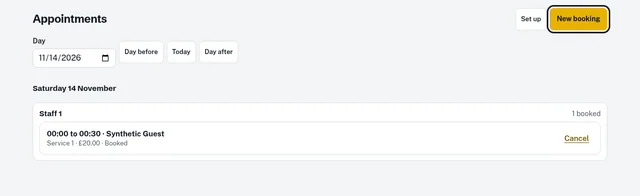
Say who takes appointments, which services and the hours of your week. Then book each customer in the diary.
How it works
Set it up once, then book
Open Appointments under Orders in the Bees-X panel.
Who takes them
In Appointments, press Set up. Choose the people who take appointments.
Which services
Add the services a customer can be booked for.
The hours of a week
Give the hours of a week, so a booking lands when someone is there to take it.
New booking
Press New booking to book a customer. Your team makes each booking.
Around it
From the booking to the sale
The customer on the sale
On the till, press Customer on the ticket. Find them by name, or add a walk-in with a name and a phone if they give one.
Tips for each person
On the pay screen press Add a tip and type the amount. It is kept for the person signed in, apart from the sale.
What each person sold
Reports, By person shows each person’s sales, average sale, hours worked and tips.
A stamp card if you want one
With a stamp card on, the items you choose earn stamps for the customer on the sale.
Read next
More for barbers and salons
Questions we get asked
How do I take appointments?
Under Orders, open Appointments and press Set up to choose staff, services and weekly hours. Then press New booking to book a customer.
Who makes the booking?
Your team does, with New booking, when the customer calls, messages or is standing in front of you.
Is it only for barbers?
No. Any business that works by appointment can set it up: the people, the services and the hours are yours to choose.
Can I see what each person earned in tips?
Yes. Reports, By person shows each person’s tips next to their sales.
Something else? Every question is answered in Help.
30 days freeNo credit card
Start free