A stamp card without the paper
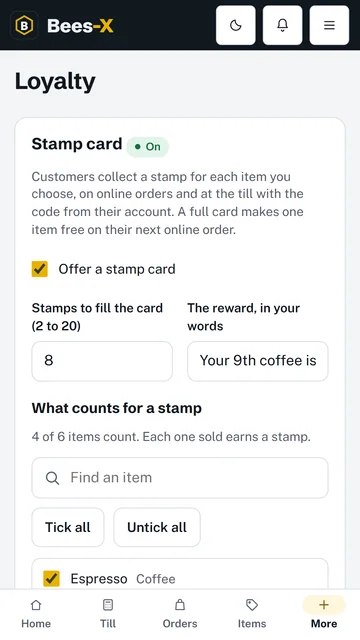
Customers earn a stamp for each item you choose, at the till by name or with their account, and on online orders. A full card makes one of those items free.
How it works
Stamps where your customers already buy
You decide what counts. Bees-X does the counting.
You choose the items and the reward
You choose which items count, such as every coffee or every haircut, and what the reward is.
At the till, by name
Put a regular on the sale by name, no account needed. What they pay for fills their till card.
With their account
A customer with an account on your shop page shows its code at the till, or orders online. Both fill their online card.
A full card
A full till card makes one of those items free at the till. A full online card works at the till or on an online order.
Around it
Know who comes back
Your customers in one list
Open Customers in the workspace menu. It lists the people who order from your order page, with their orders and stamps.
Walk-ins too
On the till, press Customer on the ticket. Find them by name, or add a walk-in with a name and a phone if they give one.
Read next
More on customers and orders
Questions we get asked
How does the stamp card work?
Put the customer on the sale by name at the till, no account needed, or they show a code from their account on your shop page. You choose which items count and what the reward is. A full till card makes one of those items free at the till; a full online card works at the till or on an online order.
Which items earn a stamp?
The ones you choose. Everything else is sold as usual and earns nothing.
How does a customer earn stamps at the counter?
Staff put the customer on the sale by name, or type the code from the customer’s account. The counted items then earn stamps.
Where do I see a customer’s stamps?
Open Customers in the workspace menu. Each person is listed with their orders and stamps.
Something else? Every question is answered in Help.
30 days freeNo credit card
Start free