The rota, the hours and the holiday, without a till
A trades crew, a workshop or a warehouse does not ring up sales. Pick that kind of workplace at setup and Bees-X starts with the team tools only: the rota, clock-in, holiday and a timesheet.
The week
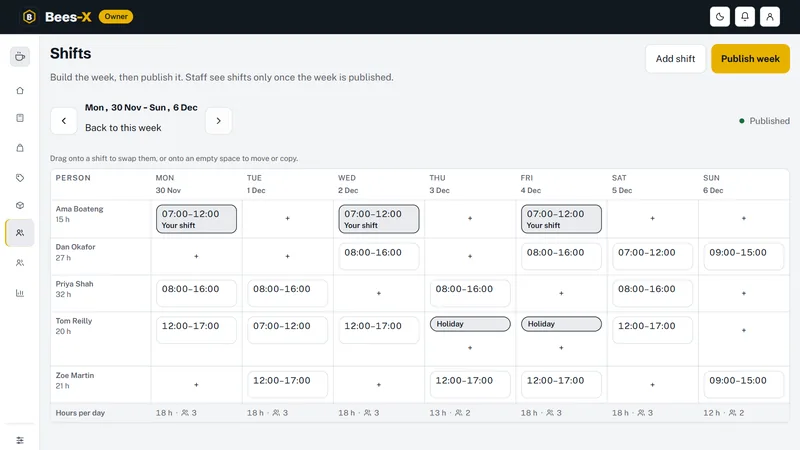
Who is on, where and when
One plan everyone can see, instead of a message thread.
Start with what you use
Pick Trades or crew at setup and you start with the rota, clock-in and holiday. A warehouse or a production kitchen starts with its items and stock as well. You can turn the till on later.
Plan and publish
On Team, open Rota. Press Add shift for each person and day, then Publish week.
Everyone is told
Each person gets their shifts by email and in their calendar. With the Android app they also get a notification when the rota is published.
Clock in on their own phone
Each person clocks in and out from their own phone. If you want a scan on site, a screen at the yard shows a code; a missed scan is flagged for review, never refused.
Hours and time off
From the clock to the accountant
Checked against the shift
A clock-in is compared with the shift on the rota. A difference goes to a manager to review, so the manager looks at a short list, not a whole week.
A timesheet for your accountant
Open Team, then Hours. Press Timesheet for accountant to open it, or Download CSV for a file. Paid holiday is listed apart from hours worked.
Holiday in the same place
Each person sends the days they want, and whoever approves holiday approves or declines them. In Ireland, annual leave and public holiday benefits are worked out for you; in the UK you record each person’s allowance.
Tasks
Assign work to your team and see what still needs doing.
Bees-X does not run payroll. The hours and the holiday are there for you to check before paying anyone.
Read next
Read these next
Questions we get asked
Do I have to use the till?
No. Choose what your business uses at setup. A crew or a workshop can start with just the team tools and turn the till on later.
How do people clock in when there is no shop counter?
On their own phone. If you want them to scan a code on site, give one account the Counter screen access for that location in Team, People, and show that screen where they arrive.
What does it cost for a crew of six?
30 days free, no credit card. Then £9.99 or €9.99 a month for one shop and 2 people, then £1.99 or €1.99 for each extra person and £4.99 or €4.99 for each extra shop. Every feature is included. Six people in one place cost 17.95 a month, in pounds or euro.
Can I give my accountant the hours?
Yes. See hours by week or month and export a clean timesheet, with paid holiday listed apart from hours worked.
Does it work out holiday?
In Ireland, yes: annual leave and public holiday benefits are worked out for you. In the UK, you record each person’s allowance and approved leave comes off it. You check the figures before paying anyone.
Something else? Every question is answered in Help.
30 days freeNo credit card
Start free